
Difference between revisions of "HowTo:Make an Object show a Status LED"
| Line 18: | Line 18: | ||
[[Category:How-To]] | [[Category:How-To]] | ||
| + | [[Category:UBIK Client]] | ||
| + | [[Category:Application Context Management]] | ||
Revision as of 16:27, 18 December 2014

An object implementing the status color classification a status LED icon is shown in the ContentBrowser's list of objects.
Criterion 1: The object's MetaClass implements the SYSCLS STATUSCOLOR classification
- Set the SYSCLS_STATUSCOLOR classification on the MetaClass of the object, using the Class Details control
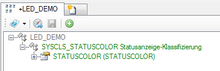
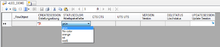
- Ensure that a MetaProperty named STATUSCOLOR of data type Integer is added to the MetaClass's property list
- Save the changes with Ctrl+S or the save command


Criterion 2: The definitions are also delivered to the client via the MetaDefinitions
- Add the STATUSCOLOR property to the list of published MetaProperties of the according context scope
- Evaluate and release the new MetaDefinitions (if necessary)
 | The value of the STATUSCOLOR property has to be of type integer and must represent a numeric color code. Its value can be entered directly or originate from a selective list item. |
